## 删除Topic命令
>bin/kafka-topics.sh --bootstrap-server localhost:9092 --delete --topic test
支持正则表达式匹配Topic来进行删除,只需要将topic 用双引号包裹起来
例如: 删除以`create_topic_byhand_zk`为开头的topic;
>>bin/kafka-topics.sh --bootstrap-server localhost:9092 --delete --topic "create_topic_byhand_zk.*"
> `.`表示任意匹配除换行符 \n 之外的任何单字符。要匹配 . ,请使用 \. 。
`·*·`:匹配前面的子表达式零次或多次。要匹配 * 字符,请使用 \*。
`.*` : 任意字符
**删除任意Topic (慎用)**
> bin/kafka-topics.sh --bootstrap-server localhost:9092 --delete --topic ".*?"
>
更多的用法请[参考正则表达式](https://www.runoob.com/regexp/regexp-syntax.html)
## 源码解析
如果觉得阅读源码解析太枯燥,请直接看 **源码总结及其后面部分**
### 1. 客户端发起删除Topic的请求
在[【kafka源码】TopicCommand之创建Topic源码解析]() 里面已经分析过了整个请求流程; 所以这里就不再详细的分析请求的过程了,直接看重点;
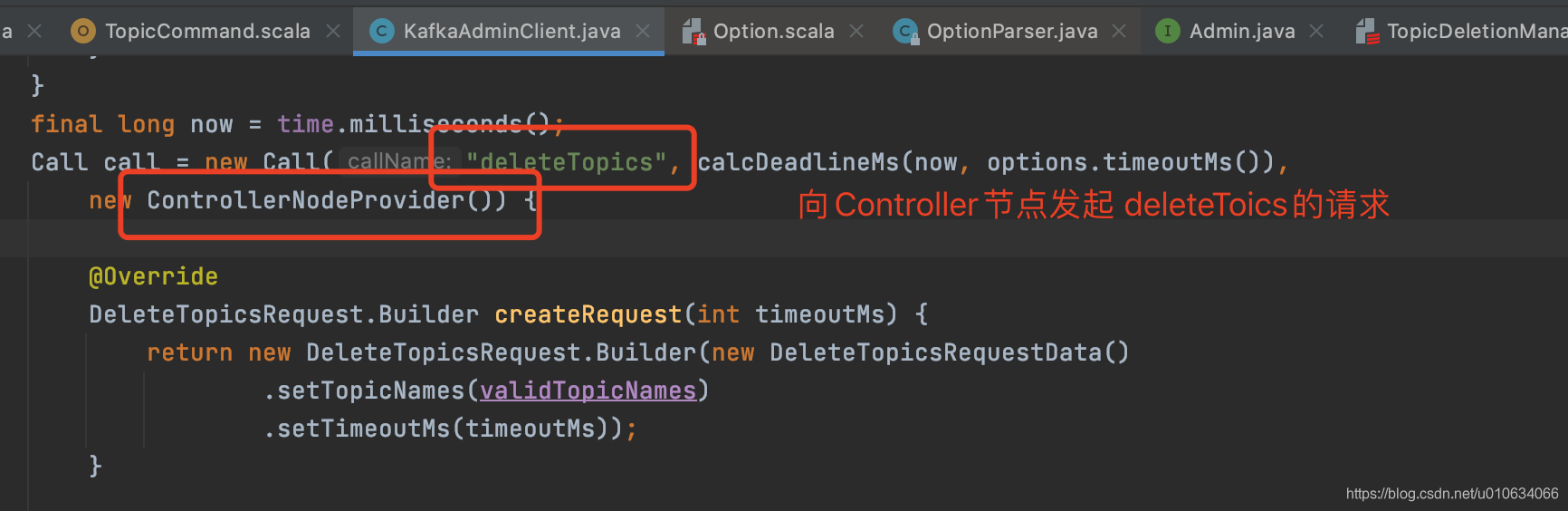
**向Controller发起 `deleteTopics`请求**
### 2. Controller处理deleteTopics的请求
`KafkaApis.handle`
`AdminManager.deleteTopics`
```scala
/**
* Delete topics and wait until the topics have been completely deleted.
* The callback function will be triggered either when timeout, error or the topics are deleted.
*/
def deleteTopics(timeout: Int,
topics: Set[String],
responseCallback: Map[String, Errors] => Unit): Unit = {
// 1. map over topics calling the asynchronous delete
val metadata = topics.map { topic =>
try {
// zk中写入数据 标记要被删除的topic /admin/delete_topics/Topic名称
adminZkClient.deleteTopic(topic)
DeleteTopicMetadata(topic, Errors.NONE)
} catch {
case _: TopicAlreadyMarkedForDeletionException =>
// swallow the exception, and still track deletion allowing multiple calls to wait for deletion
DeleteTopicMetadata(topic, Errors.NONE)
case e: Throwable =>
error(s"Error processing delete topic request for topic $topic", e)
DeleteTopicMetadata(topic, Errors.forException(e))
}
}
// 2. 如果客户端传过来的timeout<=0或者 写入zk数据过程异常了 则执行下面的,直接返回异常
if (timeout <= 0 || !metadata.exists(_.error == Errors.NONE)) {
val results = metadata.map { deleteTopicMetadata =>
// ignore topics that already have errors
if (deleteTopicMetadata.error == Errors.NONE) {
(deleteTopicMetadata.topic, Errors.REQUEST_TIMED_OUT)
} else {
(deleteTopicMetadata.topic, deleteTopicMetadata.error)
}
}.toMap
responseCallback(results)
} else {
// 3. else pass the topics and errors to the delayed operation and set the keys
val delayedDelete = new DelayedDeleteTopics(timeout, metadata.toSeq, this, responseCallback)
val delayedDeleteKeys = topics.map(new TopicKey(_)).toSeq
// try to complete the request immediately, otherwise put it into the purgatory
topicPurgatory.tryCompleteElseWatch(delayedDelete, delayedDeleteKeys)
}
}
```
1. zk中写入数据topic` /admin/delete_topics/Topic名称`; 标记要被删除的Topic
2. 如果客户端传过来的timeout<=0或者 写入zk数据过程异常了 则直接返回异常
### 3. Controller监听zk变更 执行删除Topic流程
`KafkaController.processTopicDeletion`
```scala
private def processTopicDeletion(): Unit = {
if (!isActive) return
var topicsToBeDeleted = zkClient.getTopicDeletions.toSet
val nonExistentTopics = topicsToBeDeleted -- controllerContext.allTopics
if (nonExistentTopics.nonEmpty) {
warn(s"Ignoring request to delete non-existing topics ${nonExistentTopics.mkString(",")}")
zkClient.deleteTopicDeletions(nonExistentTopics.toSeq, controllerContext.epochZkVersion)
}
topicsToBeDeleted --= nonExistentTopics
if (config.deleteTopicEnable) {
if (topicsToBeDeleted.nonEmpty) {
info(s"Starting topic deletion for topics ${topicsToBeDeleted.mkString(",")}")
// 标记暂时不可删除的Topic
topicsToBeDeleted.foreach { topic =>
val partitionReassignmentInProgress =
controllerContext.partitionsBeingReassigned.map(_.topic).contains(topic)
if (partitionReassignmentInProgress)
topicDeletionManager.markTopicIneligibleForDeletion(Set(topic),
reason = "topic reassignment in progress")
}
// add topic to deletion list
topicDeletionManager.enqueueTopicsForDeletion(topicsToBeDeleted)
}
} else {
// If delete topic is disabled remove entries under zookeeper path : /admin/delete_topics
info(s"Removing $topicsToBeDeleted since delete topic is disabled")
zkClient.deleteTopicDeletions(topicsToBeDeleted.toSeq, controllerContext.epochZkVersion)
}
}
```
1. 如果`/admin/delete_topics/`下面的节点有不存在的Topic,则清理掉
2. 如果配置了`delete.topic.enable=false`不可删除Topic的话,则将`/admin/delete_topics/`下面的节点全部删除,然后流程结束
3. `delete.topic.enable=true`; 将主题标记为不符合删除条件,放到`topicsIneligibleForDeletion`中; 不符合删除条件的是:**Topic分区正在进行分区重分配**
4. 将Topic添加到删除Topic列表`topicsToBeDeleted`中;
5. 然后调用`TopicDeletionManager.resumeDeletions()`方法执行删除操作
#### 3.1 resumeDeletions 执行删除方法
`TopicDeletionManager.resumeDeletions()`
```scala
private def resumeDeletions(): Unit = {
val topicsQueuedForDeletion = Set.empty[String] ++ controllerContext.topicsToBeDeleted
val topicsEligibleForRetry = mutable.Set.empty[String]
val topicsEligibleForDeletion = mutable.Set.empty[String]
if (topicsQueuedForDeletion.nonEmpty)
topicsQueuedForDeletion.foreach { topic =>
// if all replicas are marked as deleted successfully, then topic deletion is done
//如果所有副本都被标记为删除成功了,然后执行删除Topic成功操作;
if (controllerContext.areAllReplicasInState(topic, ReplicaDeletionSuccessful)) {
// clear up all state for this topic from controller cache and zookeeper
//执行删除Topic成功之后的操作;
completeDeleteTopic(topic)
info(s"Deletion of topic $topic successfully completed")
} else if (!controllerContext.isAnyReplicaInState(topic, ReplicaDeletionStarted)) {
// if you come here, then no replica is in TopicDeletionStarted and all replicas are not in
// TopicDeletionSuccessful. That means, that either given topic haven't initiated deletion
// or there is at least one failed replica (which means topic deletion should be retried).
if (controllerContext.isAnyReplicaInState(topic, ReplicaDeletionIneligible)) {
topicsEligibleForRetry += topic
}
}
// Add topic to the eligible set if it is eligible for deletion.
if (isTopicEligibleForDeletion(topic)) {
info(s"Deletion of topic $topic (re)started")
topicsEligibleForDeletion += topic
}
}
// topic deletion retry will be kicked off
if (topicsEligibleForRetry.nonEmpty) {
retryDeletionForIneligibleReplicas(topicsEligibleForRetry)
}
// topic deletion will be kicked off
if (topicsEligibleForDeletion.nonEmpty) {
//删除Topic,发送UpdataMetaData请求
onTopicDeletion(topicsEligibleForDeletion)
}
}
}
```
1. 重点看看`onTopicDeletion`方法,标记所有待删除分区;向Brokers发送`updateMetadataRequest`请求,告知Brokers这个主题正在被删除,并将Leader设置为`LeaderAndIsrLeaderDuringDelete`;
1. 将待删除的Topic的所有分区,执行分区状态机的转换 ;当前状态-->`OfflinePartition`->`NonExistentPartition` ; 这两个状态转换只是在当前Controller内存中更新了一下状态; 关于状态机请看 [【kafka源码】Controller中的状态机TODO....]();
2. `client.sendMetadataUpdate(topics.flatMap(controllerContext.partitionsForTopic))` 向待删除Topic分区发送`UpdateMetadata`请求; 这个时候更新了什么数据呢? 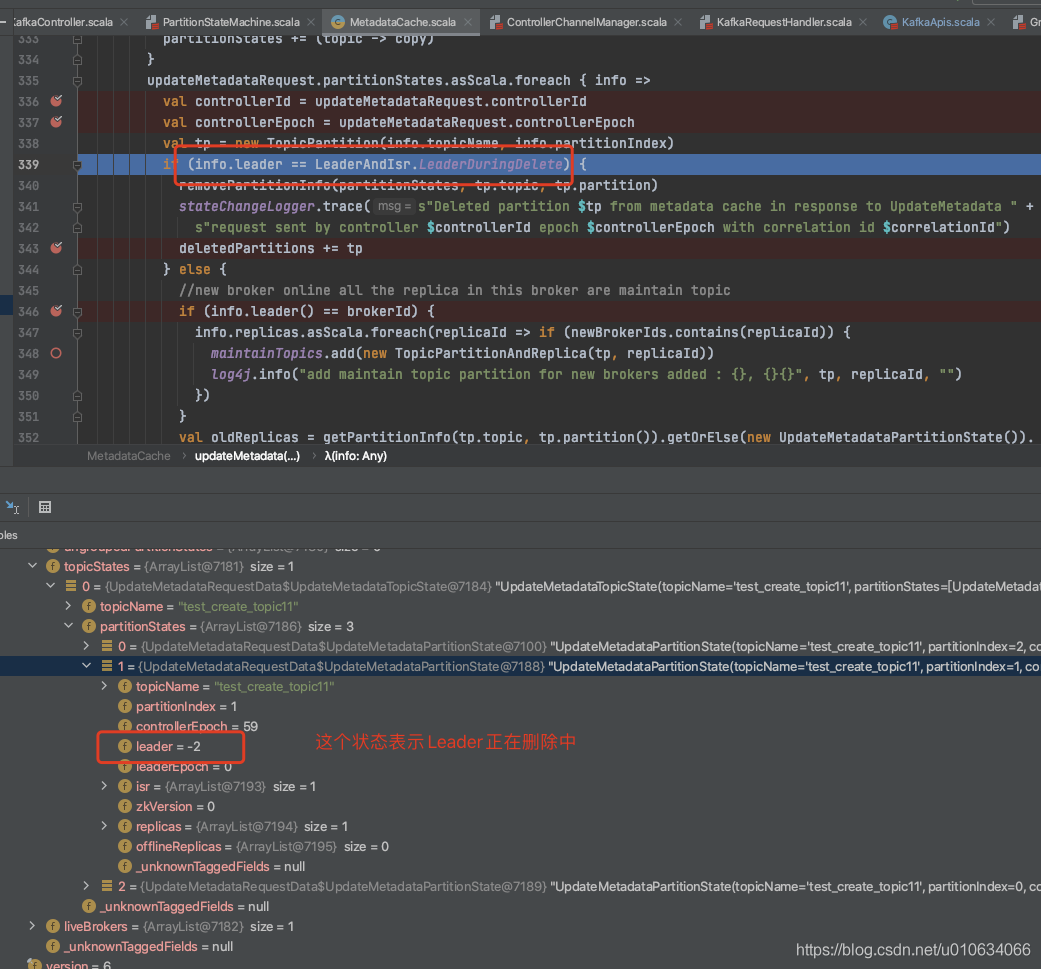
看上面图片源码, 发送`UpdateMetadata`请求的时候把分区的Leader= -2; 表示这个分区正在被删除;那么所有正在被删除的分区就被找到了;拿到这些待删除分区之后干嘛呢?
1. 更新一下限流相关信息
2. 调用`groupCoordinator.handleDeletedPartitions(deletedPartitions)`: 清除给定的`deletedPartitions`的组偏移量以及执行偏移量删除的函数;就是现在该分区不能提供服务啦,不能被消费啦
详细请看 [Kafka的元数据更新UpdateMetadata]()
4. 调用`TopicDeletionManager.onPartitionDeletion`接口如下;
#### 3.2 TopicDeletionManager.onPartitionDeletion
1. 将所有Dead replicas 副本直接移动到`ReplicaDeletionIneligible`状态,如果某些副本已死,也将相应的主题标记为不适合删除,因为它无论如何都不会成功完成
2. 副本状态转换成`OfflineReplica`; 这个时候会对该Topic的所有副本所在Broker发起[`StopReplicaRequest` ]()请求;(参数`deletePartitions = false`,表示还不执行删除操作); 以便他们停止向`Leader`发送`fetch`请求; 关于状态机请看 [【kafka源码】Controller中的状态机TODO....]();
3. 副本状态转换成 `ReplicaDeletionStarted`状态,这个时候会对该Topic的所有副本所在Broker发起[`StopReplicaRequest` ]()请求;(参数`deletePartitions = true`,表示执行删除操作)。这将发送带有 deletePartition=true 的 [`StopReplicaRequest` ]()。并将删除相应分区的所有副本中的所有持久数据
### 4. Brokers 接受StopReplica请求
最终调用的是接口
`ReplicaManager.stopReplica` ==> `LogManager.asyncDelete`
>将给定主题分区“logdir”的目录重命名为“logdir.uuid.delete”,并将其添加到删除队列中
>例如 :
>
```scala
def asyncDelete(topicPartition: TopicPartition, isFuture: Boolean = false): Log = {
val removedLog: Log = logCreationOrDeletionLock synchronized {
//将待删除的partition在 Logs中删除掉
if (isFuture)
futureLogs.remove(topicPartition)
else
currentLogs.remove(topicPartition)
}
if (removedLog != null) {
//我们需要等到要删除的日志上没有更多的清理任务,然后才能真正删除它。
if (cleaner != null && !isFuture) {
cleaner.abortCleaning(topicPartition)
cleaner.updateCheckpoints(removedLog.dir.getParentFile)
}
//重命名topic副本文件夹 命名规则 topic-uuid-delete
removedLog.renameDir(Log.logDeleteDirName(topicPartition))
checkpointRecoveryOffsetsAndCleanSnapshot(removedLog.dir.getParentFile, ArrayBuffer.empty)
checkpointLogStartOffsetsInDir(removedLog.dir.getParentFile)
//将Log添加到待删除Log队列中,等待删除
addLogToBeDeleted(removedLog)
} else if (offlineLogDirs.nonEmpty) {
throw new KafkaStorageException(s"Failed to delete log for ${if (isFuture) "future" else ""} $topicPartition because it may be in one of the offline directories ${offlineLogDirs.mkString(",")}")
}
removedLog
}
```
#### 4.1 日志清理定时线程
>上面我们知道最终是将待删除的Log添加到了`logsToBeDeleted`这个队列中; 这个队列就是待删除Log队列,有一个线程 `kafka-delete-logs`专门来处理的;我们来看看这个线程怎么工作的
`LogManager.startup` 启动的时候 ,启动了一个定时线程
```scala
scheduler.schedule("kafka-delete-logs", // will be rescheduled after each delete logs with a dynamic period
deleteLogs _,
delay = InitialTaskDelayMs,
unit = TimeUnit.MILLISECONDS)
```
**删除日志的线程**
```scala
/**
* Delete logs marked for deletion. Delete all logs for which `currentDefaultConfig.fileDeleteDelayMs`
* has elapsed after the delete was scheduled. Logs for which this interval has not yet elapsed will be
* considered for deletion in the next iteration of `deleteLogs`. The next iteration will be executed
* after the remaining time for the first log that is not deleted. If there are no more `logsToBeDeleted`,
* `deleteLogs` will be executed after `currentDefaultConfig.fileDeleteDelayMs`.
* 删除标记为删除的日志文件;
* file.delete.delay.ms 文件延迟删除时间 默认60000毫秒
*
*/
private def deleteLogs(): Unit = {
var nextDelayMs = 0L
try {
def nextDeleteDelayMs: Long = {
if (!logsToBeDeleted.isEmpty) {
val (_, scheduleTimeMs) = logsToBeDeleted.peek()
scheduleTimeMs + currentDefaultConfig.fileDeleteDelayMs - time.milliseconds()
} else
currentDefaultConfig.fileDeleteDelayMs
}
while ({nextDelayMs = nextDeleteDelayMs; nextDelayMs <= 0}) {
val (removedLog, _) = logsToBeDeleted.take()
if (removedLog != null) {
try {
//立即彻底删除此日志目录和文件系统中的所有内容
removedLog.delete()
info(s"Deleted log for partition ${removedLog.topicPartition} in ${removedLog.dir.getAbsolutePath}.")
} catch {
case e: KafkaStorageException =>
error(s"Exception while deleting $removedLog in dir ${removedLog.dir.getParent}.", e)
}
}
}
} catch {
case e: Throwable =>
error(s"Exception in kafka-delete-logs thread.", e)
} finally {
try {
scheduler.schedule("kafka-delete-logs",
deleteLogs _,
delay = nextDelayMs,
unit = TimeUnit.MILLISECONDS)
} catch {
case e: Throwable =>
if (scheduler.isStarted) {
// No errors should occur unless scheduler has been shutdown
error(s"Failed to schedule next delete in kafka-delete-logs thread", e)
}
}
}
}
```
`file.delete.delay.ms` 决定延迟多久删除
### 5.StopReplica 请求成功 执行回调接口
> Topic删除完成, 清理相关信息
触发这个接口的地方是: 每个Broker执行删除`StopReplica`成功之后,都会执行一个回调函数;`TopicDeletionStopReplicaResponseReceived` ; 当然调用方是Controller,回调到的也就是Controller;
传入回调函数的地方
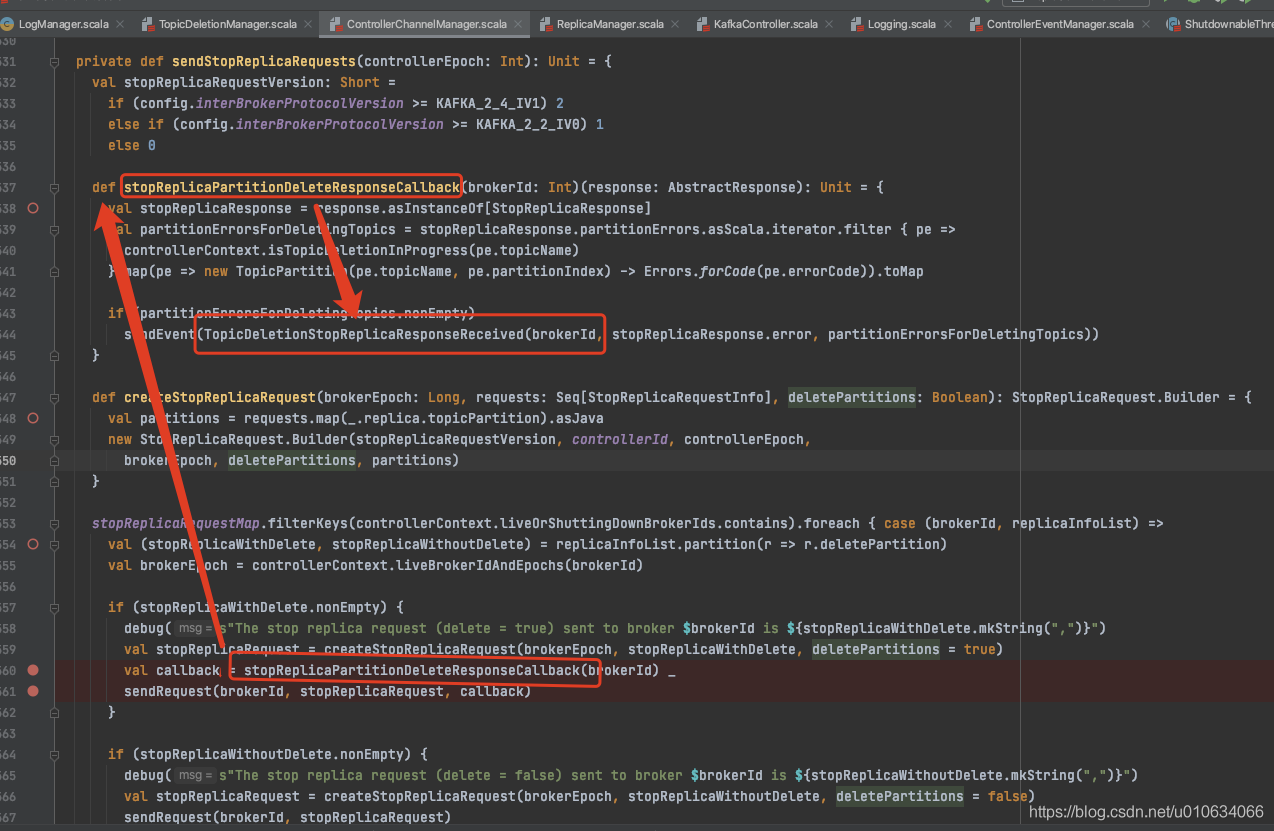
执行回调函数 `KafkaController.processTopicDeletionStopReplicaResponseReceived`
1. 如果回调有异常,删除失败则将副本状态转换成==》`ReplicaDeletionIneligible`,并且重新执行`resumeDeletions`方法;
2. 如果回调正常,则变更状态 `ReplicaDeletionStarted`==》`ReplicaDeletionSuccessful`;并且重新执行`resumeDeletions`方法;
3. `resumeDeletions`方法会判断所有副本是否均被删除,如果全部删除了就会执行下面的`completeDeleteTopic`代码;否则会继续删除未被成功删除的副本
```scala
private def completeDeleteTopic(topic: String): Unit = {
// deregister partition change listener on the deleted topic. This is to prevent the partition change listener
// firing before the new topic listener when a deleted topic gets auto created
client.mutePartitionModifications(topic)
val replicasForDeletedTopic = controllerContext.replicasInState(topic, ReplicaDeletionSuccessful)
// controller will remove this replica from the state machine as well as its partition assignment cache
replicaStateMachine.handleStateChanges(replicasForDeletedTopic.toSeq, NonExistentReplica)
controllerContext.topicsToBeDeleted -= topic
controllerContext.topicsWithDeletionStarted -= topic
client.deleteTopic(topic, controllerContext.epochZkVersion)
controllerContext.removeTopic(topic)
}
```
1. 清理内存中相关信息
2. 取消注册被删除Topic的相关节点监听器;节点是`/brokers/topics/Topic名称`
3. 删除zk中的数据包括;`/brokers/topics/Topic名称`、`/config/topics/Topic名称` 、`/admin/delete_topics/Topic名称`
### 6. Controller启动时候 尝试继续处理待删除的Topic
我们之前分析Controller上线的时候有看到
`KafkaController.onControllerFailover`
以下省略部分代码
```scala
private def onControllerFailover(): Unit = {
// 获取哪些Topic需要被删除,哪些暂时还不能删除
val (topicsToBeDeleted, topicsIneligibleForDeletion) = fetchTopicDeletionsInProgress()
info("Initializing topic deletion manager")
//Topic删除管理器初始化
topicDeletionManager.init(topicsToBeDeleted, topicsIneligibleForDeletion)
//Topic删除管理器 尝试开始删除Topi
topicDeletionManager.tryTopicDeletion()
```
#### 6.1 获取需要被删除的Topic和暂时不能删除的Topic
` fetchTopicDeletionsInProgress`
1. `topicsToBeDeleted`所有需要被删除的Topic从zk中`/admin/delete_topics` 获取
2. `topicsIneligibleForDeletion`有一部分Topic还暂时不能被删除:
①. Topic任意分区正在进行副本重分配
②. Topic任意分区副本存在不在线的情况(只有topic有一个副本所在的Broker异常就不能能删除)
3. 将得到的数据存在在`controllerContext`内存中
#### 6.2 topicDeletionManager.init初始化删除管理器
1. 如果服务器配置`delete.topic.enable=false`不允许删除topic的话,则删除`/admin/delete_topics` 中的节点; 这个节点下面的数据是标记topic需要被删除的意思;
#### 6.3 topicDeletionManager.tryTopicDeletion尝试恢复删除
这里又回到了上面分析过的`resumeDeletions`啦;恢复删除操作
```scala
def tryTopicDeletion(): Unit = {
if (isDeleteTopicEnabled) {
resumeDeletions()
}
}
```
## 源码总结
整个Topic删除, 请看下图
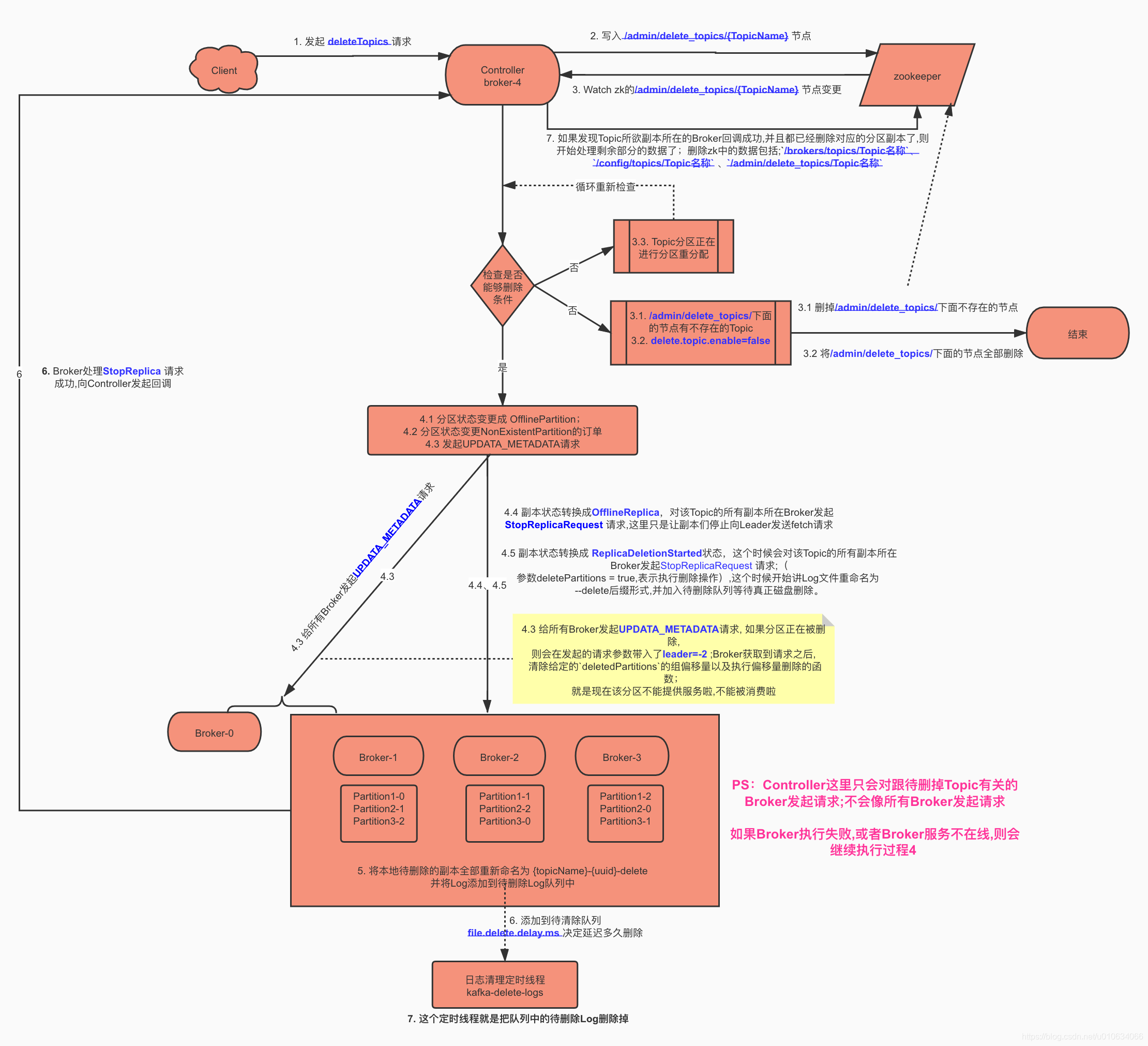
几个注意点:
1. Controller 也是Broker
2. Controller发起删除请求的时候,只是跟相关联的Broker发起删除请求;
3. Broker不在线或者删除失败,Controller会持续进行删除操作; 或者Broker上线之后继续进行删除操作
## Q&A
列举在此主题下比较常见的问题; 如果读者有其他问题可以在评论区评论, 博主会不定期更新
### 什么时候在/admin/delete_topics写入节点的
>客户端发起删除操作deleteTopics的时候,Controller响应deleteTopics请求, 这个时候Controller就将待删除Topic写入了zk的`/admin/delete_topics/Topic名称`节点中了;
### 什么时候真正执行删除Topic磁盘日志
>Controller监听到zk节点`/admin/delete_topics`之后,向所有存活的Broker发送删除Topic的请求; Broker收到请求之后将待删除副本标记为--delete后缀; 然后会有专门日志清理现场来进行真正的删除操作; 延迟多久删除是靠`file.delete.delay.ms`来决定的;默认是60000毫秒 = 一分钟
### 为什么正在重新分配的Topic不能被删除
> 正在重新分配的Topic,你都不知道它具体会落在哪个地方,所以肯定也就不知道啥时候删除啊;
> 等分配完毕之后,就会继续删除流程
### 如果在`/admin/delete_topics/`中手动写入一个节点会不会正常删除
> 如果写入的节点,并不是一个真实存在的Topic;则将会直接被删除
> 当然要注意如果配置了`delete.topic.enable=false`不可删除Topic的话,则将`/admin/delete_topics/`下面的节点全部删除,然后流程结束
> 如果写入的节点是一个真实存在的Topic; 则将会执行删除Topic的流程; 本质上跟用Kafka客户端执行删除Topic操作没有什么不同
### 如果直接删除ZK上的`/brokers/topics/{topicName}`节点会怎样
>TODO...
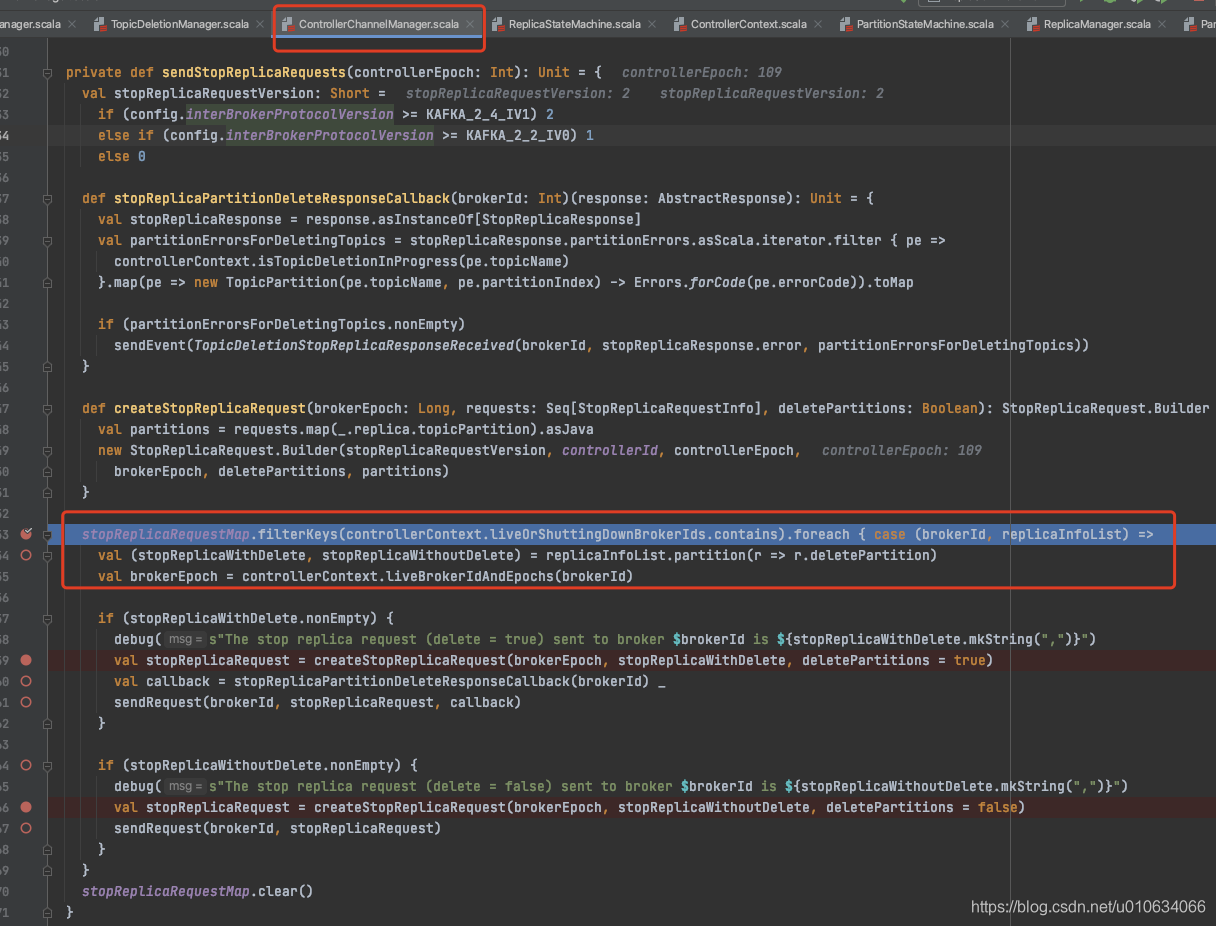
### Controller通知Brokers 执行StopReplica是通知所有的Broker还是只通知跟被删除Topic有关联的Broker?
> **只是通知跟被删除Topic有关联的Broker;**
> 请看下图源码,可以看到所有需要被`StopReplica`的副本都是被过滤了一遍,获取它们所在的BrokerId; 最后调用的时候也是`sendRequest(brokerId, stopReplicaRequest)` ;根据获取到的BrokerId发起的请求
> 
### 删除过程有Broker不在线 或者执行失败怎么办
>Controller会继续删除操作;或者等Broker上线然后继续删除操作; 反正就是一定会保证所有的分区都被删除(被标记了--delete)之后才会把zk上的数据清理掉;
### ReplicaStateMachine 副本状态机
> 请看 [【kafka源码】Controller中的状态机TODO]()
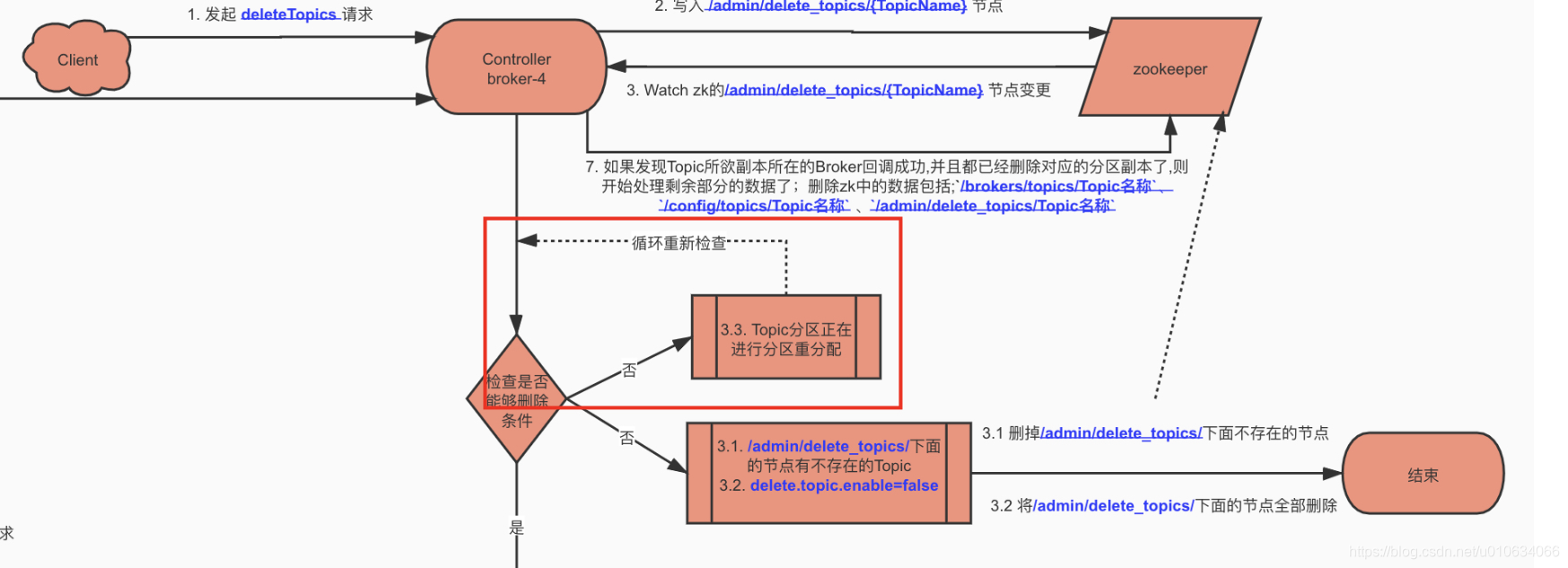
### 在重新分配的过程中,如果执行删除操作会怎么样
> 删除操作会等待,等待重新分配完成之后,继续进行删除操作
> 
Finally: 本文阅读源码为 `Kafka-2.5`